# LaunchPad Deployment Options
Where you install LaunchPad decides which accounts it can serve — and what level of access its Satellites get.
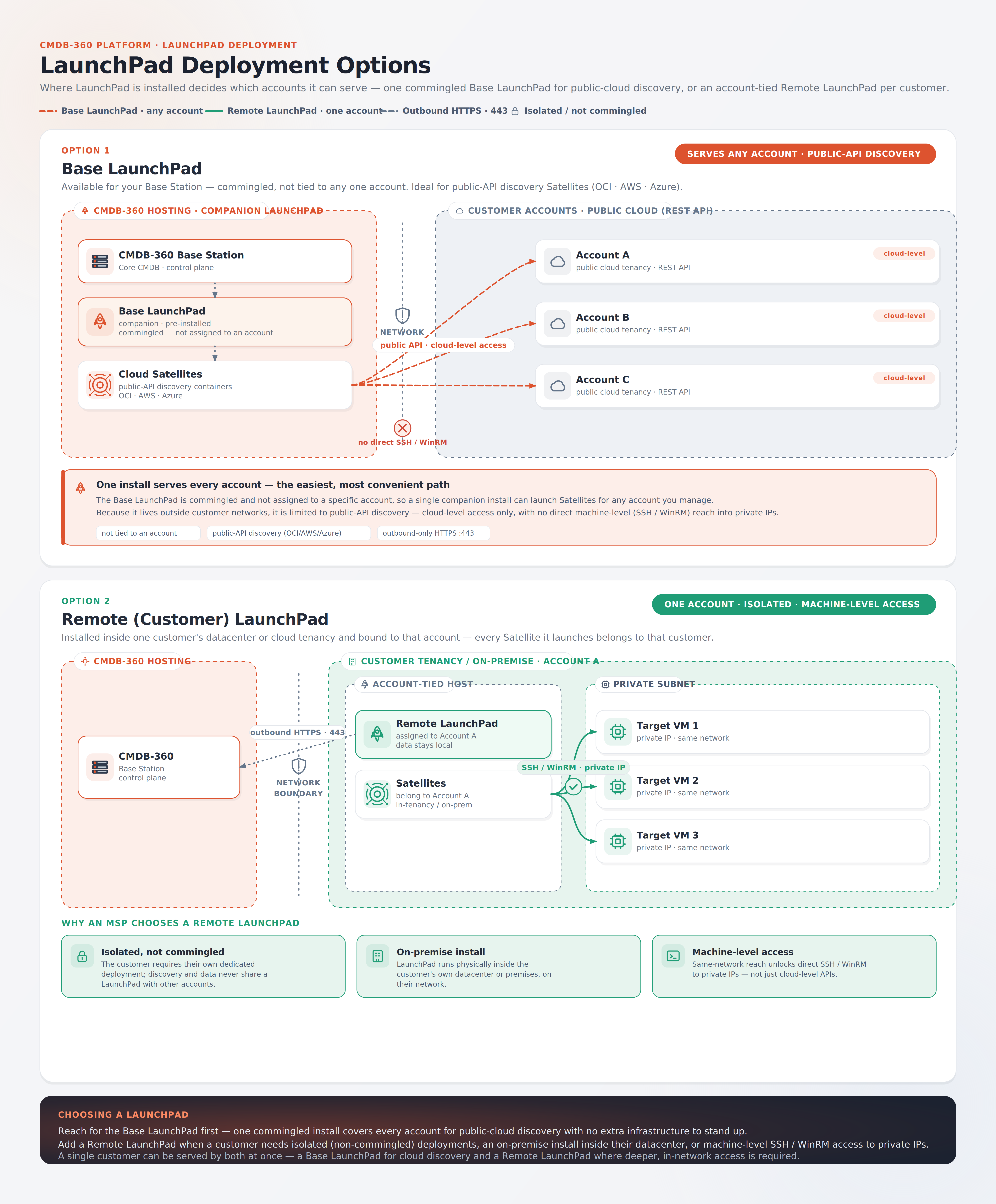
CMDB-360 LaunchPad can be run in two ways: a Base LaunchPad that serves every account for public-cloud discovery, or an account-tied Remote (Customer) LaunchPad deployed inside a customer’s own environment. This page explains both options, the trade-offs between them, and how to choose.
# Overview
LaunchPad is the virtualization layer that makes deploying Satellites efficient — it runs on a virtual machine or dedicated server and uses Docker to launch any number of CMDB-360 Satellite container images from a single host. Proprietary management software ties the Docker host into the Base Station portal, so deployment is point-and-click.
What changes between the two deployment options is not how a Satellite is built — it is where the LaunchPad lives relative to the customer’s assets. That location determines two things:
- Which accounts the LaunchPad’s Satellites can belong to (any account, or one specific account).
- What level of access those Satellites have to the customer’s assets (cloud-level API only, or cloud-level plus machine-level).
# At a glance
| Base LaunchPad | Remote (Customer) LaunchPad | |
|---|---|---|
| Where it runs | Alongside your CMDB-360 Base Station | Inside the customer’s datacenter or cloud tenancy |
| Account binding | Commingled — not tied to any one account | Assigned to a single customer account |
| Serves which accounts | Any account you manage | Only the account it is assigned to |
| Cloud-level access (provider API) | Yes | Yes |
| Machine-level access (SSH/WinRM) | No | Yes |
| Ideal Satellites | Public-API discovery (OCI, AWS, Azure) | Any Satellite, including in-network machine access |
| Setup effort | Lowest — one companion install serves all | One LaunchPad per customer environment |
# Option 1 — Base LaunchPad
Available for your Base Station, the Base LaunchPad is the standard companion LaunchPad you deploy and configure to CMDB-360. It is commingled — deliberately not assigned to a single account — so one install can launch Satellites for any account you manage. This is the easiest and most convenient path: a single companion LaunchPad with no extra infrastructure to stand up per customer.
Note
Base LaunchPads can be a single deployment, a clustered deployment (using Docker Swarm), or multiple single deployments. You may adjust the compute and memory resources for any of these instances. Start with a single deployment and add additional LaunchPads as your deploy Satellites, it all depends on the compute resources required to support the Satellite deployments. The CMDB-360 Support Team can help you architect your Base LaunchPad as your needs evolve.
Because the Base LaunchPad sits outside any customer’s network, it is best suited to Satellites that gather discovery data over a public API — typically the public-cloud Satellites for OCI, AWS, and Azure.
# The restriction: cloud-level access only
A Satellite running on the Base LaunchPad has no network route to a customer’s private IP addresses. It therefore operates with cloud-level access only:
- It can call the cloud provider’s REST API using credentials stored in the vault — start/stop/create/destroy/modify VMs, disks, networks, load balancers, and so on.
- It cannot open a direct SSH (Linux) or WinRM (Windows) session to a customer machine.
- Machine-level tasks that would normally need SSH (OS patching, file changes, user management) are only possible through a cloud provider’s agent-based Run Command service, where one exists — and not every platform (for example, VMware) offers an equivalent.
Note
The Base LaunchPad is the one LaunchPad that is not assigned to an account. When you provision any other LaunchPad in the Base Station portal, you name it and assign it to a specific account; the Base LaunchPad is the exception.
# When to use the Base LaunchPad
- You want a single, centrally managed LaunchPad that can service many accounts without deploying infrastructure into each customer’s environment.
- The Satellites you need gather discovery data over a public cloud API (OCI, AWS, Azure).
- Automation needs are limited to cloud resource lifecycle management, plus any command execution a Run Command–style service can cover.
# Option 2 — Remote (Customer) LaunchPad
A Remote LaunchPad is deployed inside a single customer’s datacenter or cloud tenancy and associated with that customer account. Every Satellite launched from it belongs to that customer, and its discovery and data stay inside the customer’s own environment. The recommended practice is one Remote LaunchPad per customer environment.
Because the Remote LaunchPad runs on the same network as the targets, its Satellites have direct connectivity to the private IP addresses of the customer’s machines. This unlocks both access levels:
- Cloud-level access — identical to the Base LaunchPad, calling cloud provider APIs with vault-stored credentials.
- Machine-level access — direct SSH (Linux) or WinRM (Windows) connections to the customer’s VMs over their private IPs, using keys or passwords from the vault. This enables the full range of standard Ansible modules (file, user, package, and service management) and any Galaxy collection that expects a live connection to the host.
The LaunchPad needs only outbound HTTPS (port 443) back to your Base Station (and to Docker Hub to pull Satellite images) — no inbound ports are required.
# Why an MSP chooses a Remote LaunchPad
- Isolated, not commingled. The customer requires their own dedicated deployment; discovery and data never share a LaunchPad with other accounts, keeping everything inside their tenancy.
- On-premise install. The LaunchPad runs physically inside the customer’s own datacenter or premises, on their network.
- Machine-level access. Same-network reach enables direct SSH/WinRM to private IPs — the only way to perform deep OS configuration, compliance remediation, or use collections that require a genuine host connection, rather than being limited to cloud-level APIs.
# When to use a Remote LaunchPad
- The customer requires that all sensitive data, credentials, and direct machine access stay entirely within their own tenancy.
- Automation needs go beyond what a cloud-provider command-agent service can offer — for example, deep OS configuration or use of community/Galaxy collections that need a real SSH/WinRM connection.
- Low-latency, session-based execution is preferred over the polling delay inherent to agent/Run Command services.
# How access maps to Satellite topology
The Base vs. Remote LaunchPad choice mirrors the two supported Ansible Satellite deployment topologies, because both come down to whether the Satellite has a network path to the customer’s private IP space:
- A Satellite on a Base LaunchPad runs the cloud-only topology — cloud provider modules and agent-based Run Command, with no direct host connection.
- A Satellite on a Remote LaunchPad runs the client-side topology — full cloud-level access plus direct SSH/WinRM machine-level access.
CMDB-360 presents the appropriate playbooks for the CI type and provider you select regardless of which Satellite ultimately executes them, provided the Satellite’s connection type matches what the playbook requires. For the full playbook-level detail, see Ansible Satellite Deployment Topologies.
# Choosing a LaunchPad
- Reach for the Base LaunchPad first. One commingled install covers every account for public-cloud discovery, with no per-customer infrastructure.
- Add a Remote LaunchPad when a customer needs isolated (non-commingled) deployments, an on-premise install inside their datacenter, or machine-level SSH/WinRM access to private IPs.
- Both can serve the same customer at once — a Base LaunchPad handling routine cloud discovery, and a Remote LaunchPad deployed only where deeper, in-network access is required.
# Related
- LaunchPad Overview
- Configure (or Re-Configure) LaunchPad
- Ansible Satellite Deployment Topologies
- Installing Satellites From Docker Images
© Base2Summit LLC · CMDB-360 Docs